Process Inputs capture key business and organizational information used by FUTUROOT for contextualized analysis, benchmarking, and industry-standard recommendations.
Process Inputs are primarily used in Monitoring and Needle Analysis.
Navigating to Process Inputs
To access Process Inputs:
Open Process Settings.
Click Process Inputs.
Open Process Settings.
Click Process Inputs.
Creating a Process Input
To access Process Inputs:
Open Process Settings.
Click Process Inputs.
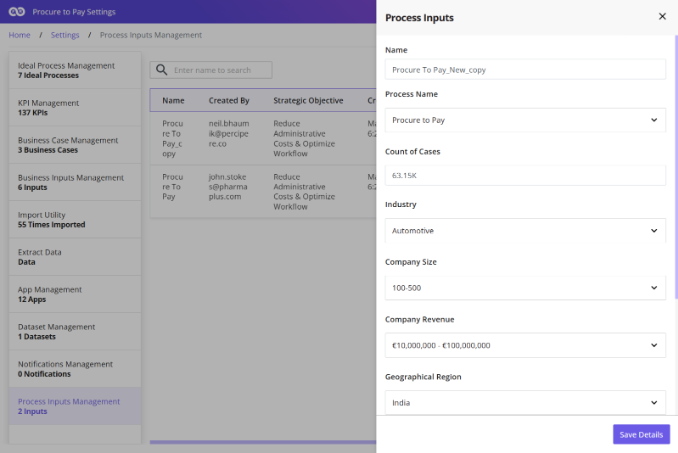
The following fields are available:
Feature
Description
Name
Displays process connectors as a heat map based on delay duration, with connectors color-coded according to the time taken between activities. Legends indicate the corresponding time ranges.
Process Type
Users can switch from Default Bottleneck to Dynamic Bottleneck to define custom thresholds, legends, and bucket ranges.
Industry
Industry sector of the organization
Company Size
Organization size category
Company Revenue
Annual revenue (Optional)
Region
Geographic region
Benchmark Period
Period used for industry comparisons
Technology Stack
Systems and technologies used (Optional)
Strategic Objective
Business goal or improvement objective
Saving and Activating Process Inputs
After completing all required information:
Click Save Details.
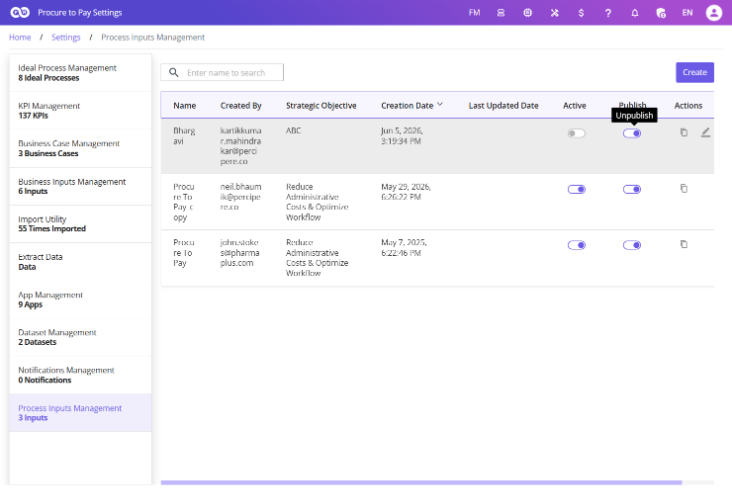
Activate the Process Input using the toggle.
Publish it if required.
Once activated and published, the Process Input becomes available for use in: Monitoring, Needle Analysis & Industry Benchmarking
Best Practices
When creating Process Inputs:
Keep company information up to date.
Define clear strategic objectives.
Select the most relevant industry classification.
Review inputs periodically as business priorities evolve.
Accurate Process Inputs improve the quality of industry benchmarks and AI-driven recommendations across FUTUROOT.