FUTUROOT Smart PDF
An interactive process intelligence report that consolidates key process insights into a single downloadable PDF. Includes interactive navigation for quick movement between sections.
Unlike a traditional PDF, FUTUROOT SmartPDF includes interactive navigation, allowing users to quickly move between different sections of the report.
Downloading a SmartPDF
Users can generate and download a SmartPDF directly from the Process Dashboard.
To download a SmartPDF:
- Navigate to the required Process.
- Click the Download icon on the Process Card → click SmartPDF.
- Select KPIs to include, choose an Ideal Process for Conformance Analysis.
- Click Download. The SmartPDF is delivered to your registered email address.
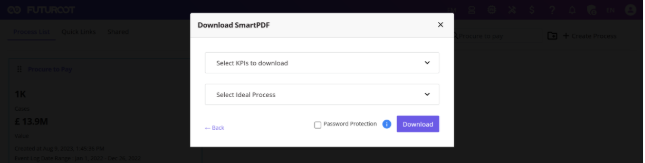
Before generating the report, users can customize the content by selecting:
- KPIs to include in the report
- Ideal Process for Conformance Analysis
- Additional process insights (based on configuration)
After making the required selections, click Download.
Password Protection
For enhanced security, FUTUROOT allows users to password-protect SmartPDF reports before downloading them.
Passwords are applied only to the current SmartPDF download. Future downloads require a new password.
To enable password protection:
- Select the Password Protection checkbox.
- Click Download.
- Enter a password in the password configuration window.
- Confirm the password.
- Proceed with the download.
The generated SmartPDF will be protected using the specified password. It is recommended to store the password securely, as it will be required each time the SmartPDF is opened.
Report Structure
| Section | Description |
|---|---|
| Landing Page | Process Name, Generated Timestamp, User Information, Report Metadata |
| Process Overview | Overview tab (Total Cases, Variants, Net Value, Cycle Time) and Process Map (Variant, Activity, Connector Statistics) |
| Process Metrics | Selected KPI values with business context |
| Conformance Analysis | Key Statistics (Conformance Rate, Cases) and Violations (Missing Activities, Invalid Paths) |
| Variant Statistics | Variant Sequence, Cases, Activities, Net Value, Cycle Time per variant |
| Activity Statistics | Activity Name, Cases, Incoming/Outgoing counts, Frequency |
| Connector Statistics | Source Activity, Target Activity, Cases, Connector Frequency |
Benefits of SmartPDF
FUTUROOT SmartPDF provides a portable and shareable process intelligence report that enables users to:
- Review process performance offline
- Share process insights with stakeholders
- Document process analysis results
- Track KPIs and conformance metrics
- Maintain audit-ready process records
By consolidating process information into a single interactive report, SmartPDF simplifies process analysis and improves collaboration across teams.